
The Problem Is Not Hearing Speech, but Finishing the Work
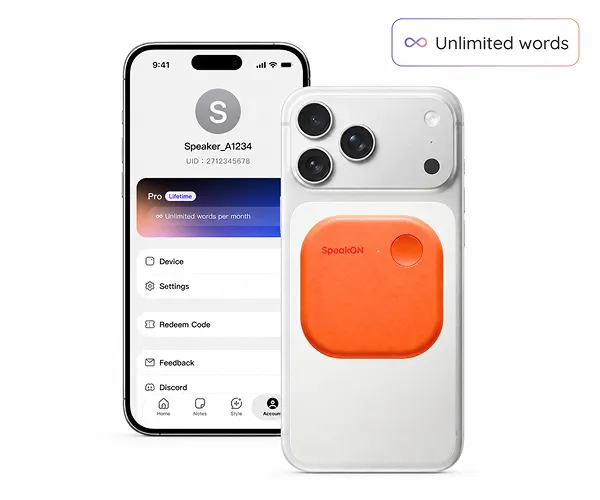
SpeakON is a MagSafe AI voice button for the iPhone. It weighs 25 grams and measures 58 by 58 by 6 millimeters, with its own microphone, a 220 mAh battery, and 128 MB of storage. A user presses the button and speaks, while the processed text is inserted into an already open field in Messages, Mail, Slack, or Notion. The intended users are founders, managers, consultants, and other professionals who need to capture thoughts while moving between places and tasks.
The product is not primarily addressing whether a phone can recognize speech. That problem is comparatively mature. Its target is the unfinished output: ordinary dictation preserves fillers, repetitions, false starts, and restarts, leaving the user to clean the result in another app before pasting it into the place where the work actually happens. SpeakON reframes voice input as text prepared for delivery, which is why it calls itself an AI Communicator rather than simply another dictation tool.
The Hardware Matters Because It Separates Resources
SpeakON’s most consequential architectural choice is that the button captures audio itself instead of relying on the iPhone’s system microphone. The phone microphone remains available for calls, FaceTime, or CarPlay, while the companion app does not need to hold continuous background microphone access. For users who are reluctant to grant that permission to a voice tool, this separation is more meaningful than simply having another recording device.
The button also has its own battery and storage, allowing it to buffer speech while the phone is locked or offline and sync later when connectivity returns. The company specifies more than 10 hours of continuous use, over two weeks of standby, charging in under 1.5 hours over USB-C, up to five minutes of continuous input per press, and an approximate capture range of 60 centimeters. These choices make the device an independent edge entry point rather than an app that must remain active on the phone, but they also introduce another object to carry, charge, and manage.
The Real Destination Is the Keyboard Extension
The hardware addresses capture, while the iOS system keyboard extension addresses delivery. SpeakON inserts processed text into the active text field, avoiding switches between a recording app, an editing screen, and the destination app, as well as the clipboard round trip. The button therefore aims to reduce the number of operations between having an idea and producing something ready to send or save.
However, “system-wide” does not mean native to the operating system. The experience still depends on an iOS keyboard extension and on the destination exposing a field that accepts keyboard input. The product requires iOS 16 or later, and MagSafe attachment requires an iPhone 12 or newer. It works with environments such as Messages, Mail, Slack, and Notion, but that does not establish universal coverage across iOS. For a technical lead, this compatibility boundary matters more than the magnetic attachment: whether it reaches the team’s critical applications determines whether it is workflow infrastructure or merely a convenient input accessory.
It Does Not Transcribe Verbatim; It Shapes the Message
SpeakON treats speech as raw material rather than text that must be preserved word for word. Smart Polish removes fillers, restarts, and redundant phrasing to make the result read more like writing. Smart List detects sequential intent and turns a spoken stream into structured items or to-dos. Style adapts the register to the destination, making the same sentence more casual in Messages and more professional in Mail. Translation can produce text directly in 12 languages, while Dictionary retains names, jargon, and preferred spellings across sessions.
This feature set changes the evaluation criteria. A conventional dictation tool is mainly judged by how many words it recognizes correctly. SpeakON must also answer whether it understood what the user intended to deliver. Turning “remember these three things” into a task list can be useful, but a mistake in order, ownership, or tone is not merely a misrecognized word; it is a rewritten intention. Voice Edits lets users revise existing output by speaking, and Notes stores offline captures as titled, editable, searchable entries. Both reduce rework, but neither removes the need for review.
Moving from Text Entry to Actions Raises the Trust Bar
SpeakON is sold for a one-time $129 in the United States, including Pro Lifetime with no recurring fee. The companion app can be downloaded for free and used without the hardware, giving teams a low-cost way to evaluate the text-shaping layer before deploying a physical device. The company also says that voice data is encrypted, never sold, and not used to train AI models, and reports SOC 2 Type II, HIPAA, and GDPR compliance.
In the supplied material, however, those security and compliance claims are statements from the vendor rather than independently verified evidence. The more important forward-looking issue is SpeakON Agent, which the company plans to make available in October 2026. It extends a press from producing text to preparing reviewable Notes, Tasks, and user-confirmed Actions. The feature builds on the existing capture, shaping, and keyboard-output architecture, but it raises the trust requirement. Users can quickly edit text; for tasks and actions, the system must make clear what it intends to do, why it reached that conclusion, and which steps require human confirmation.
SpeakON should therefore first be evaluated as a mobile productivity input device, not as an automated execution system. Its strongest use cases are in-between-meeting capture, field notes, and cross-app drafting, where it removes unlocking, switching, and copying. Before deployment, teams should verify three boundaries: coverage of the iOS text fields they actually use, the data path for offline buffering and cloud synchronization, and the rate at which text shaping alters familiar termin