
The Problem Is Not Transcription but Output
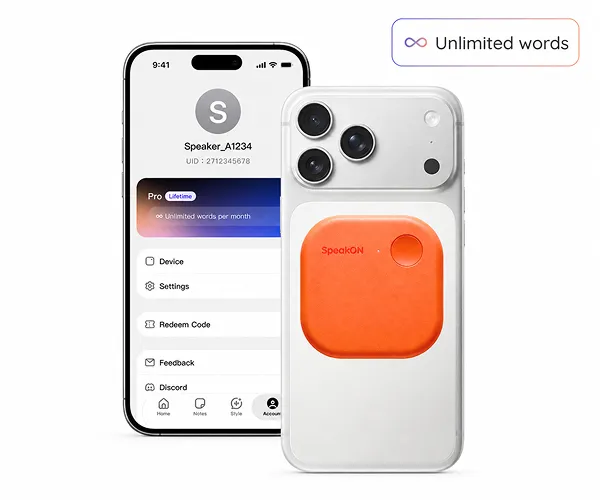
SpeakON, the company behind the product, has introduced a 25-gram MagSafe button for the iPhone with its own microphone, battery, and onboard storage. The company calls it an “AI Communicator” and targets founders, managers, consultants, and field professionals who have ideas to express but do not want to stop their work to unlock a phone and type. The device measures 58 by 58 by 6 millimeters, supports up to five minutes of continuous input per press, and is rated for more than ten hours of continuous use and over two weeks of standby time.
That positioning differs from conventional dictation tools. Phones have been able to convert speech into text for years, but the result usually preserves fillers, repetitions, false starts, and unfinished phrasing. Users then have to clean up the raw transcript and move it into an email, message, or document. SpeakON reframes the problem as turning spoken material into text that is ready to send, edit, or act on, making the product unit a complete path from speech to delivery rather than a single transcription event.
The Dedicated Microphone Is the Architectural Pivot
The most important difference between SpeakON and an ordinary voice app is not the button’s shape. Audio is captured by the button itself rather than by the iPhone’s system microphone. That avoids competing with CarPlay, phone calls, or FaceTime for the phone’s microphone. It also means the companion app does not need continuous background microphone access, reducing a permission burden that many users dislike. With its own battery and 128MB of onboard storage, the device can capture while the phone is locked or offline and synchronize later.
This design moves voice capture outside the phone’s operating-system path. It gives up the simplicity of a software-only product that can run on any supported device, but it creates a clearer input boundary: pressing the button starts capture, the button buffers the recording, and the phone receives and processes it. The stated capture range is roughly 60 centimeters, charging is handled over USB-C, and charging takes less than 1.5 hours. For field work, offline buffering and locked-phone operation may matter more to continued adoption than marginally faster transcription.
The Text Is Shaped Before It Lands
SpeakON’s software treats speech as source material rather than as a final record that must be preserved word for word. Smart Polish removes fillers, restarts, and redundant phrasing so the result reads more like written language. Smart List attempts to detect sequence or task intent and returns bullets or to-dos. Style adapts the register to the destination app, allowing the same spoken thought to sound more casual in Messages and more professional in Mail. Translation supports twelve languages directly in the active field, while Dictionary preserves names, jargon, and preferred spellings across sessions.
The common feature is inference after transcription. The system is not only deciding which words were spoken. It is also deciding how those words should be used. That raises both the product value and the risk: removing spoken repetition can save editing time but alter emphasis, while generating a list can reduce organization work but requires the system to understand sentence structure correctly. SpeakON also offers Voice Edits, which let users revise existing output by speaking, and Notes, where captures can be stored as titled, editable, searchable entries.
The Keyboard Extension Returns Text to the Existing Workflow
SpeakON does not ask users to complete their work inside a separate app. Its companion software is installed as a system-wide iOS keyboard extension, allowing processed text to appear in Messages, Mail, Slack, Notion, or any field that accepts keyboard input. After the user presses the button and speaks, the result appears in the active field for review and editing before sending. There is no app switch and no clipboard round trip.
That is what makes the product a potential communication layer rather than a standalone voice utility. A separate voice app often traps the transcript in its own interface, forcing users to copy, switch, and paste before returning to the actual work tool. The keyboard-extension approach puts the output back into the host application, but it also makes the experience dependent on iOS extension behavior and the way each target app handles text fields. The product requires iOS 16 or later, and magnetic attachment requires an iPhone 12 or newer. Users without MagSafe can use the included magnetic ring, while the companion app can be tried without buying the hardware.
The Tradeoff Ultimately Lands on Trust and Review Cost
SpeakON costs $129 in the United States as a one-time purchase, with Pro Lifetime included and no recurring fee. The company says voice data is encrypted, never sold, and not used to train AI models, while users can control cloud synchronization. It also states that the service has SOC 2 Type II, HIPAA, and GDPR compliance. For teams handling customer communication, health-related information, or internal knowledge, these claims are useful inputs for evaluation, but they do not replace a concrete review of data flows, retention, keyboard-extension permissions, and cloud-processing boundaries.
The larger boundary is that SpeakON remains a human-confirmed text-shaping tool, not an unsupervised agent that sends messages on its own. The company plans to make SpeakON Agent available in October 2026, extending the same press from producing text to preparing Notes, Tasks, and user-confirmed Actions. A review-and-confirm design is better suited to high-risk communication than direct execution, but it also shows why the right metrics are not limited to recognition accuracy. Teams must ask whether rewrites preserve intent, whether users can spot errors quickly, and how many steps are actually removed between speaking and confirmation.
For technical leaders, the safer judgment is to evaluate SpeakON as a candidate input layer rather than as a more attractive voice button. Good pilot scenarios include email drafts, post-meeting capture, field notes, and multilingual replies where human review is acceptable. Tasks involving irreversible actions, sensitive information, or highly contro